

POS system or payment terminal? What your Saudi event needs
Compare POS software, payment terminals, ECR connections and SoftPOS, then specify the sales and payment tools your Saudi event needs.
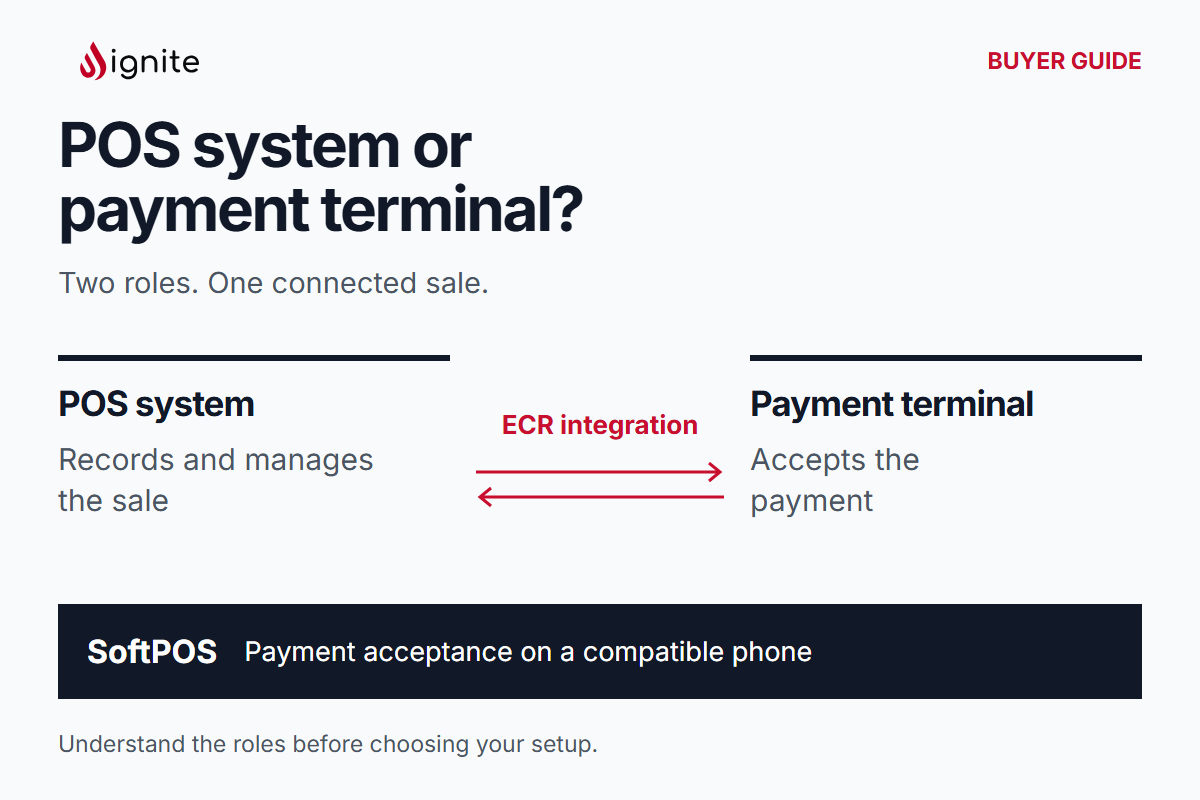
When someone asks for a “POS machine”, they may mean a device that accepts payment, a system that manages the sale, or both. For an event organizer, merchant or production company, clarifying that request helps you choose tools around the work your team needs to do.
Start with two questions: how will staff record what the customer buys, and how will the customer pay? A POS system handles the sale: items, quantities, prices and the sales receipt. A payment terminal handles payment acceptance. These roles may share hardware, but they remain different jobs in the buying brief.
Four roles to distinguish
Scroll the table horizontally to review each decision and its evidence.
| Role | Main job | What to describe in your request |
|---|---|---|
| POS system | Manage the sale from item selection and quantities through pricing and receipt | Products, selling tasks, customer documents and sales information needed |
| Payment terminal | Accept the customer’s payment | How and where customers pay, and the sales system already in use |
| ECR connection | Link the sales system and payment terminal for the amount and payment flow | The existing sales setup and how staff move from the basket to payment |
| SoftPOS | Accept contactless payments on a compatible phone | Mobile selling locations, payment needs and the other sales tasks staff must perform |
The distinction matters even when a screen looks similar. A handheld device can serve more than one role. Ask what work it performs, rather than choosing by its shape or assuming that every payment device manages a product catalog.
In Arabic, “جهاز نقاط بيع” is often used when asking about payment equipment. In your brief, use نظام نقاط البيع for the sales system and جهاز الدفع for the payment terminal, then describe whether you need one or both.
Follow one illustrative purchase
Imagine a visitor choosing a T-shirt at a temporary merchandise counter. The seller selects the item and size, records the quantity and reviews the price in the sales system. That creates the sale the customer is paying for.
Next comes payment acceptance. With an ECR connection, the sales system and terminal are linked for the amount and payment flow. The seller follows the payment result and completes the sale and customer document. The sales record explains what was purchased; the payment record explains the payment associated with it.
If the buyer asks only for a payment terminal, the brief still needs to explain where the item selection, price and sales document will come from. If those tasks already have a home, payment acceptance may be the missing piece. If they do not, the counter needs sales operations as well.
Three buying situations
You already have a POS system and need payment acceptance
Name the system you use and describe the current checkout. Explain where staff select items, how they arrive at the amount and what document the customer receives. Then identify the payment task you want to add or connect.
Review payment terminals in that context. This gives the conversation a useful starting point: the existing sales workflow and the payment experience you want alongside it.
A temporary counter needs to run the whole sale
A counter opening for an event may need a catalog, product choices, quantities, prices and receipts as well as payment acceptance. Start with the POS system and describe the selling tasks together. Include the information the merchant needs to review after trading.
For example, knowing that a payment was accepted answers a different question from knowing which product and variant sold. Your buying brief should capture both when both matter to the business.
A mobile team needs contactless acceptance
SoftPOS allows contactless payment acceptance on a compatible phone. It can be relevant when staff take payments away from a fixed counter. Describe where the team works and how they identify the sale and amount before accepting payment.
Treat product selection, order records and customer documents as separate requirements in the same brief. That keeps the mobile workflow clear and helps you specify the sales tools alongside the payment function.
Which payment setup does each event selling point need?
“We want customers to pay with a wallet” is a useful starting point. Does the customer want to choose a wallet at online checkout, or tap their phone in person? A customer who pays on a website and collects a purchase at the event has already paid online. The collection desk needs to find the order; a visitor buying the same item at that desk needs a way to pay there.
Consider a merchant selling merchandise online, at a stand and through a roaming team. A producer could use this working brief to separate the three decisions:
Online, before arriving
- The customer completes checkout on the merchant’s site
- Existing online store and checkout
- Which wallet would buyers like to choose online, and how will staff find the paid order at collection?
In person, at a staffed counter
- The cashier records the basket and presents the amount
- Existing POS and payment terminal
- Do customers want to tap a phone or card? Should the POS pass the amount to the terminal through an ECR connection?
In person, away from the counter
- A roaming seller takes the payment where the customer is standing
- The team’s current order-taking tool and phone
- Is the order already recorded, or must the seller build the basket too? Would SoftPOS on a compatible phone suit contactless acceptance here?
For your own brief, write one line per selling point: Customer pays at … / Merchant or team taking payment … / Current setup … / Choice still open …. If a wallet matters to the buyer, name it on the relevant line. That makes “online checkout for pre-orders” and “tap at the merchandise stand” two clear requests even when the customer uses the same phone.
Connect the counter to the wider business
Ignite Commerce brings catalog, orders, payments and invoicing into one commerce platform, with location operations and reporting. This broader view matters when your event includes several merchants, selling locations or channels.
Decide which information belongs in the sales workflow and who needs to use it afterwards. A merchant may need item-level sales information; an organizer may need a view across participating locations. Describe the questions your reports should answer so the conversation covers the work behind the transaction.
Copy this short request
- Existing system: We currently use…
- Selling tasks: Staff need to select or record…
- Payments: Customers need to pay by…
- Selling points: We have… counters or mobile teams.
- Documents and reporting: Customers need…; our team needs to review…
- Event: Saudi city, venue and dates…
Use the merchant POS and payments guide to develop the operating plan, or the organizer requirements guide for registration, access and managed-support needs alongside commerce.
Plan your event with Ignite. Share your request with the team to discuss sales software, payment acceptance and the wider event operation together.